

Select parcels
Click parcels on the map to add them to your site. Click a selected parcel again to remove it. A tooltip on the right side of the screen reads Select Parcel and confirms you can select parcels to add or remove from the project site.Selecting parcels on the map
Draw a boundary
When the available parcels don’t match the actual shape of your site, draw the boundary by hand. A tooltip on the right reads Draw Polygon with instructions: click on the map to start a polygon and add points, then double-click to finish.1
Select the draw tool
Choose the draw tool from the toolbar at the top of the map.
2
Click to add points
Click each corner of your site to place a point.
3
Double-click to close
Double-click the final point to close the shape.
Drawing a custom site boundary
Edit a boundary
After selecting parcels or drawing a shape, switch to edit mode to fine-tune the boundary. A tooltip on the right reads Edit Polygon: click and drag points on your parcel to edit. Blue dots on the boundary are drag handles.Editing an existing site boundary
Change the site later
If the site changes after you create the project, you don’t need a new one. In the viewer toolbar, click Edit Boundaries and select or draw the new boundary. Then click Edit Setbacks
  to check the setbacks for the new site. Your changes save to the same project.
Warning surfaces
Parafin warns you about potential issues with your site boundary.Parcel adjacency
If you select parcels that are not adjacent to each other, a red Parcel Adjacency warning appears in the Site Boundary section: “Selected parcels must be adjacent to form a contiguous site. Add or remove parcels, or adjust the boundary geometry to proceed.” The Next button stays disabled until the parcels form one contiguous site.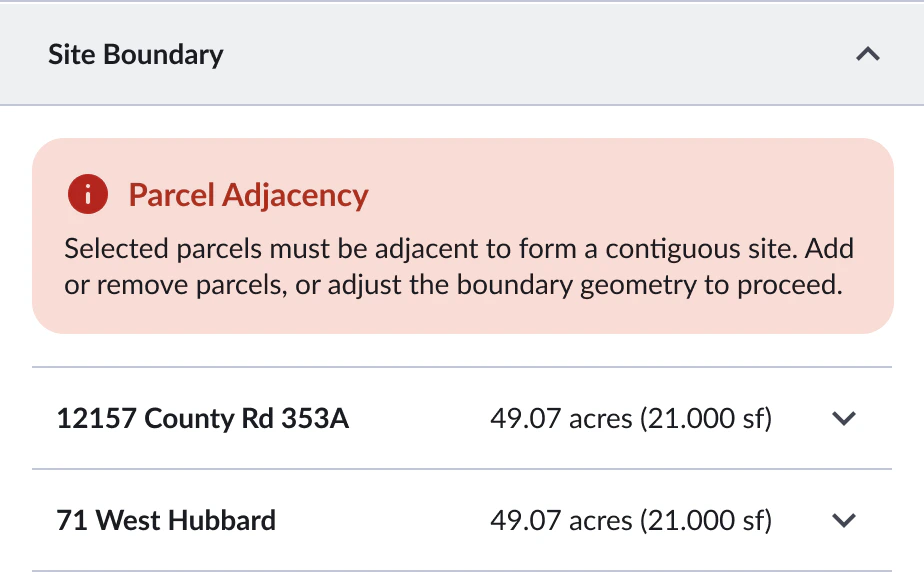
Parcel Adjacency warning in the Site Boundary section
Address conflicts
When the site boundary does not contain the project address, a warning opens under the address. Click Address Suggestions to pick one of the addresses your selected parcels carry, or Ignore For Now to keep the address you entered and carry on.
Project Address Not Within Selected Site
The selected site boundary does not contain the project address. You can adjust the address or continue with the current site selection.
Address Suggestions
Ignore For Now
Warning when the address falls outside the site