> ## Documentation Index
> Fetch the complete documentation index at: https://help.parafin.ai/llms.txt
> Use this file to discover all available pages before exploring further.

# Variant details

> Explore floorplans, tables, diagrams, and program options for the selected design variant.

Select any variant in the ranking list to load its details in the middle panel. Everything in this panel — floorplans, tables, diagrams, and program options — updates when you switch variants.

## Floorplans

Floorplan previews sit at the top of the middle panel. Click any floor number to load that floor's plan. Use the expand icon to view it fullscreen.
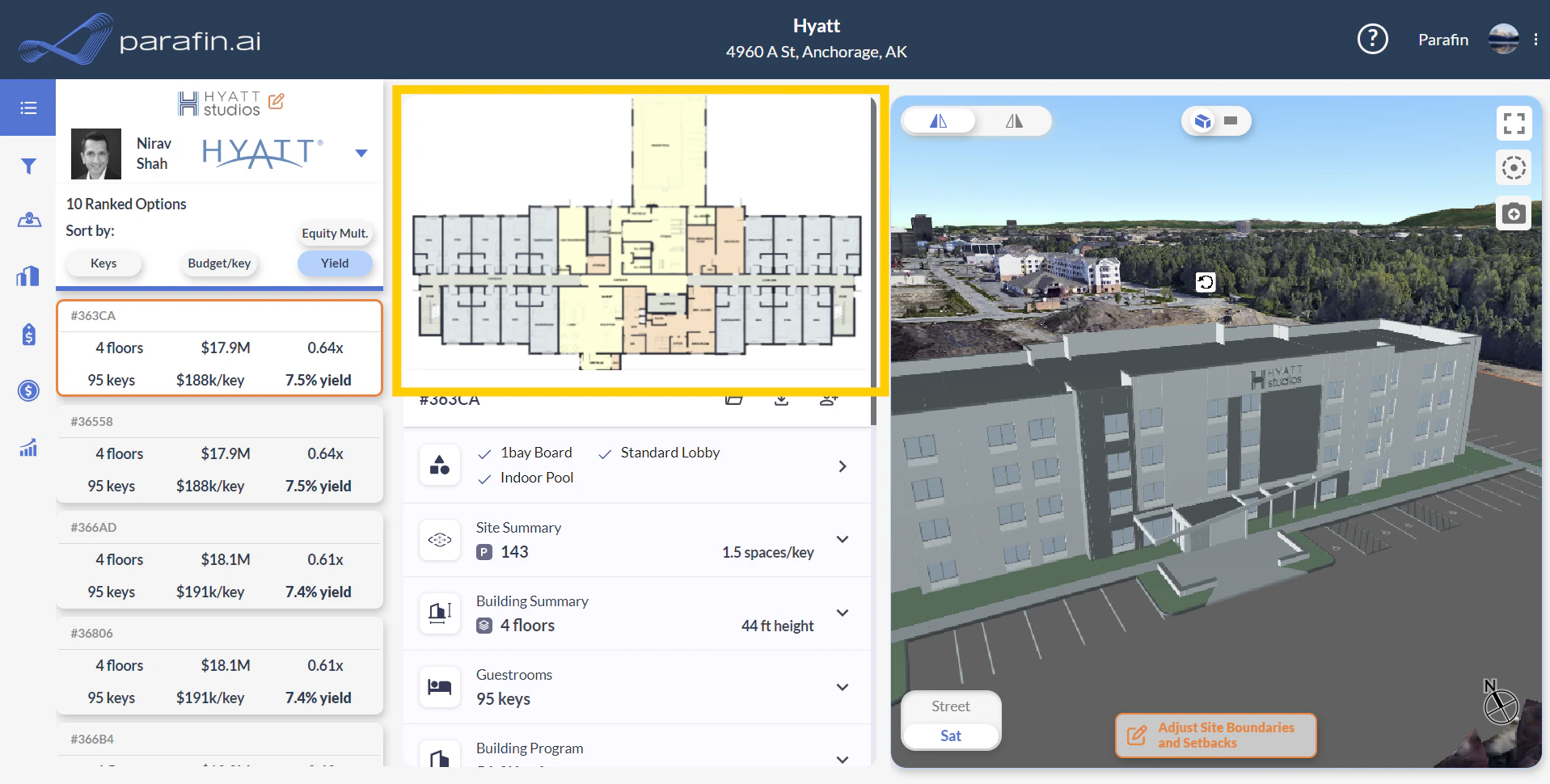
<Frame caption="Floorplan previews at the top of the middle panel">
  <img src="https://mintcdn.com/parafin-16645fe6/02WIAw4W18BDb3PZ/images/releases/1.49/floorplans.png?fit=max&auto=format&n=02WIAw4W18BDb3PZ&q=85&s=4f765060c8aa671d400faf7e740ce9bf" alt="Floorplan previews at the top of the middle panel" width="1917" height="970" data-path="images/releases/1.49/floorplans.png" />
</Frame>

## Tables

Collapsed tables show a clean high-level overview of the selected variant. Expand any section for granular detail.
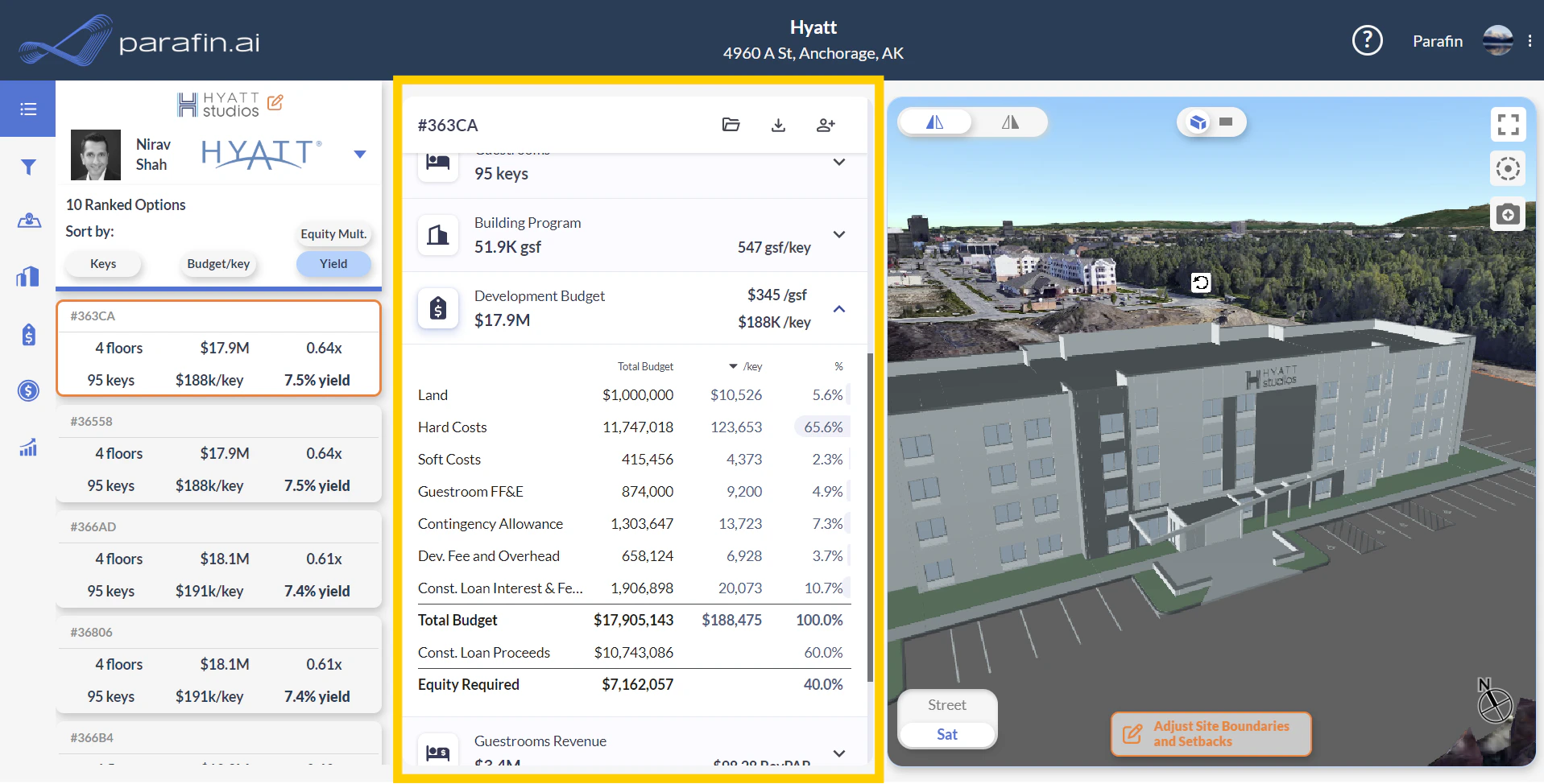
<Frame caption="Dynamic, expandable tables scoped to the selected variant">
  <img src="https://mintcdn.com/parafin-16645fe6/02WIAw4W18BDb3PZ/images/releases/1.49/tables.png?fit=max&auto=format&n=02WIAw4W18BDb3PZ&q=85&s=08d1d007f0c8c42cbb3381d6707f240f" alt="Dynamic tables in the middle panel showing high-level and detail views" width="1917" height="974" data-path="images/releases/1.49/tables.png" />
</Frame>

Inline diagrams visualize Site Summary, Building Summary, and Guestrooms data alongside the tables.
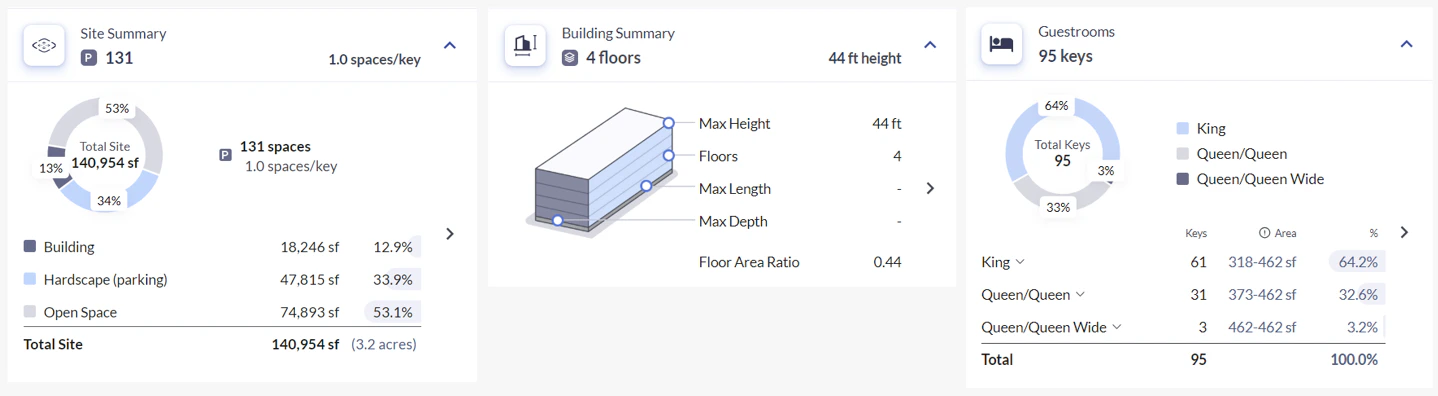
<Frame caption="Inline diagrams for Site Summary, Building Summary, and Guestrooms">
  <img src="https://mintcdn.com/parafin-16645fe6/02WIAw4W18BDb3PZ/images/releases/1.49/helpful_diagrams.png?fit=max&auto=format&n=02WIAw4W18BDb3PZ&q=85&s=9539a21a1fefef99f15b6751259e7048" alt="Helpful diagrams supplementing the data tables" width="1438" height="396" data-path="images/releases/1.49/helpful_diagrams.png" />
</Frame>

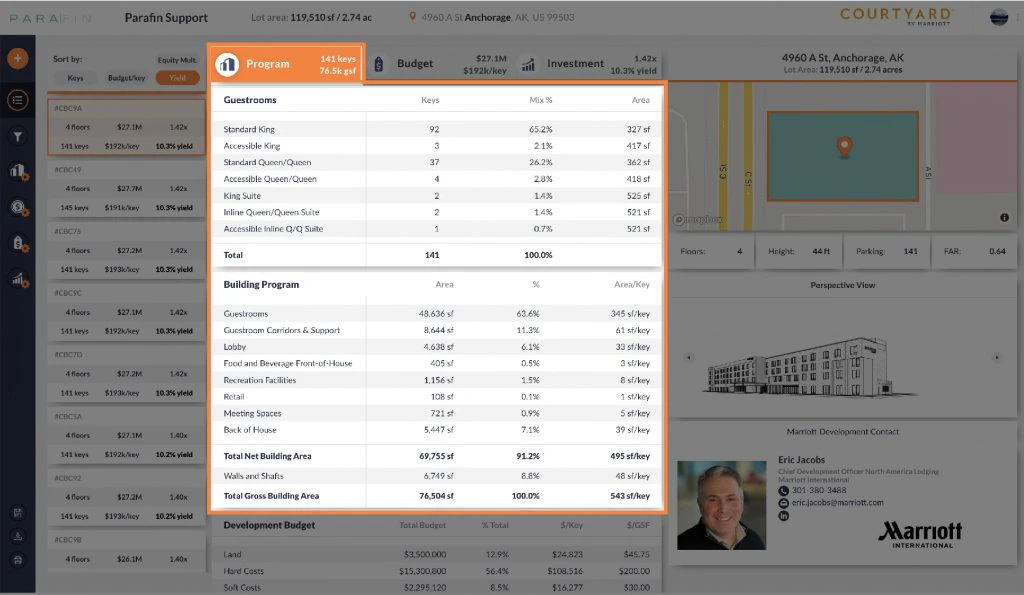
### Program

Guestroom mix, building program, and area breakdowns.
<Frame>
  <img src="https://mintcdn.com/parafin-16645fe6/jjcQ1gK2qvkGNhuq/images/support/legacy/designs/output-program.jpg?fit=max&auto=format&n=jjcQ1gK2qvkGNhuq&q=85&s=728ff1faf88768cffa30dfc8ed1f874d" alt="Program table" width="1024" height="595" data-path="images/support/legacy/designs/output-program.jpg" />
</Frame>

<Frame caption="Non-guestroom program option labels">
  <img src="https://mintcdn.com/parafin-16645fe6/TkPMdHzUoYAeRjw5/images/releases/1.57/program_options_labels.png?fit=max&auto=format&n=TkPMdHzUoYAeRjw5&q=85&s=346af523946a9b3b57a401fd2626524f" alt="Non-guestroom program option labels" width="581" height="235" data-path="images/releases/1.57/program_options_labels.png" />
</Frame>

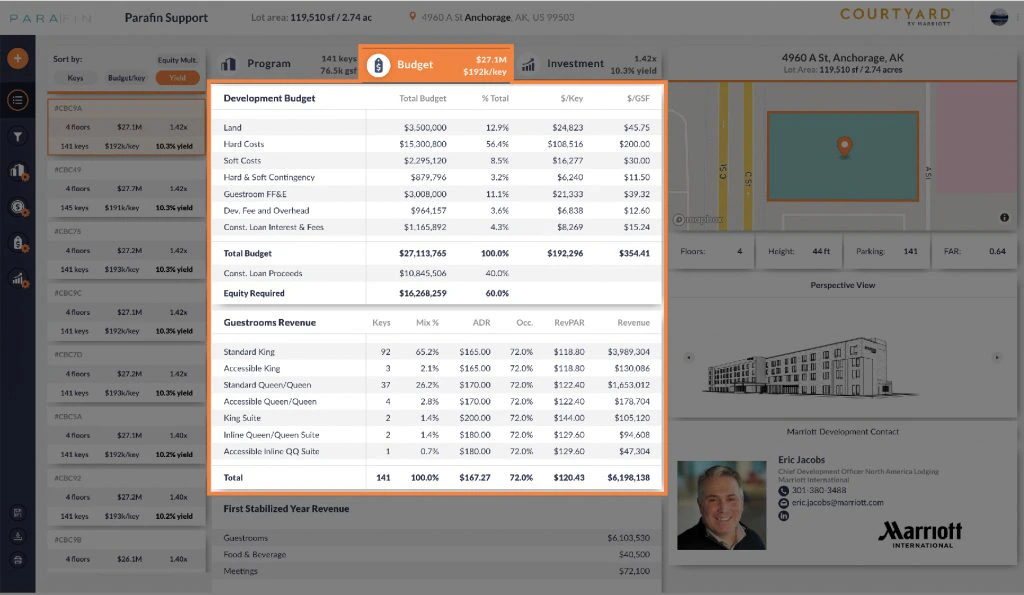
### Budget

Development budget computed from your assumptions and the selected variant's geometry.
<Frame>
  <img src="https://mintcdn.com/parafin-16645fe6/jjcQ1gK2qvkGNhuq/images/support/legacy/designs/output-budget.jpg?fit=max&auto=format&n=jjcQ1gK2qvkGNhuq&q=85&s=2a9b8ed2bb8c78cdfbe881f6a0b0dc14" alt="Budget table" width="1024" height="595" data-path="images/support/legacy/designs/output-budget.jpg" />
</Frame>

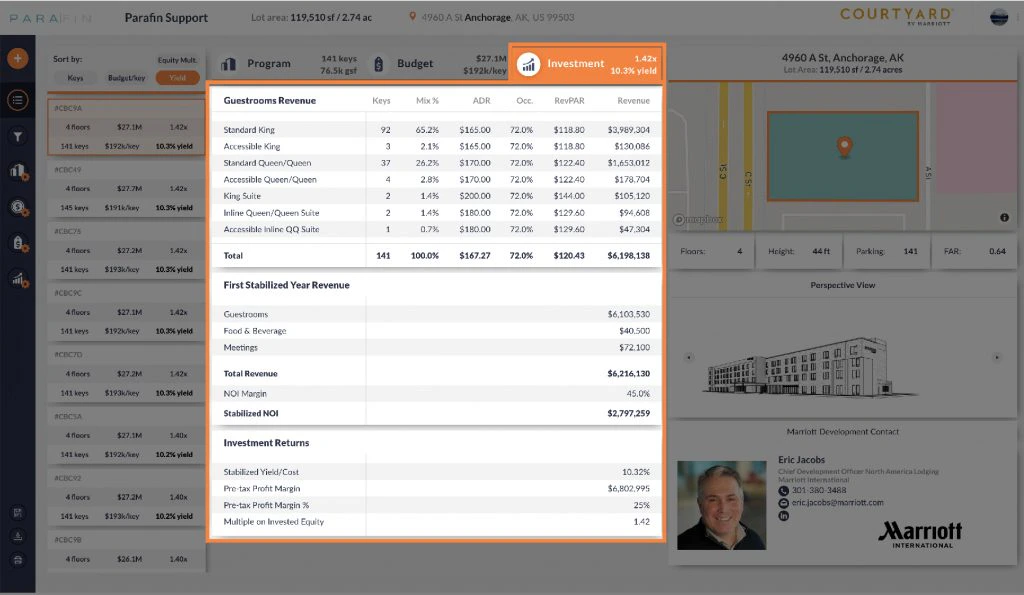
### Investment

First stabilized year revenues, NOI, and return metrics.
<Frame>
  <img src="https://mintcdn.com/parafin-16645fe6/jjcQ1gK2qvkGNhuq/images/support/legacy/designs/output-investment.jpg?fit=max&auto=format&n=jjcQ1gK2qvkGNhuq&q=85&s=ca34489a517103babf5430896eb1970b" alt="Investment table" width="1024" height="595" data-path="images/support/legacy/designs/output-investment.jpg" />
</Frame>

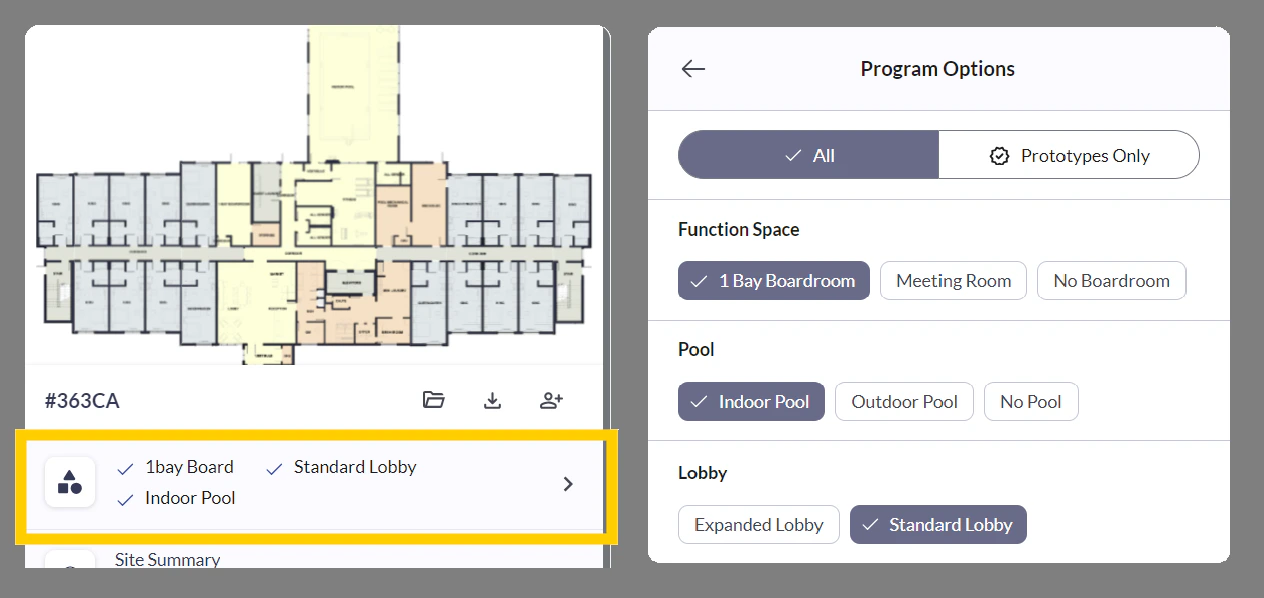
## Program options

Non-guestroom program details — meeting room options, pool configurations, building entrance layouts. Click any option to refine the configuration; the ranked variant results filter to match.
<Frame caption="Program options summary and filters">
  <img src="https://mintcdn.com/parafin-16645fe6/02WIAw4W18BDb3PZ/images/releases/1.49/program_options.png?fit=max&auto=format&n=02WIAw4W18BDb3PZ&q=85&s=0555f0c1daacff8bb2b293f0f4ff7196" alt="Non-guestroom program options summary with filter controls" width="1264" height="598" data-path="images/releases/1.49/program_options.png" />
</Frame>

## Exporting a variant

Click the download button in the Variants window to open the export dialog. Four export options are available. Past exports stay accessible from the folder icon.
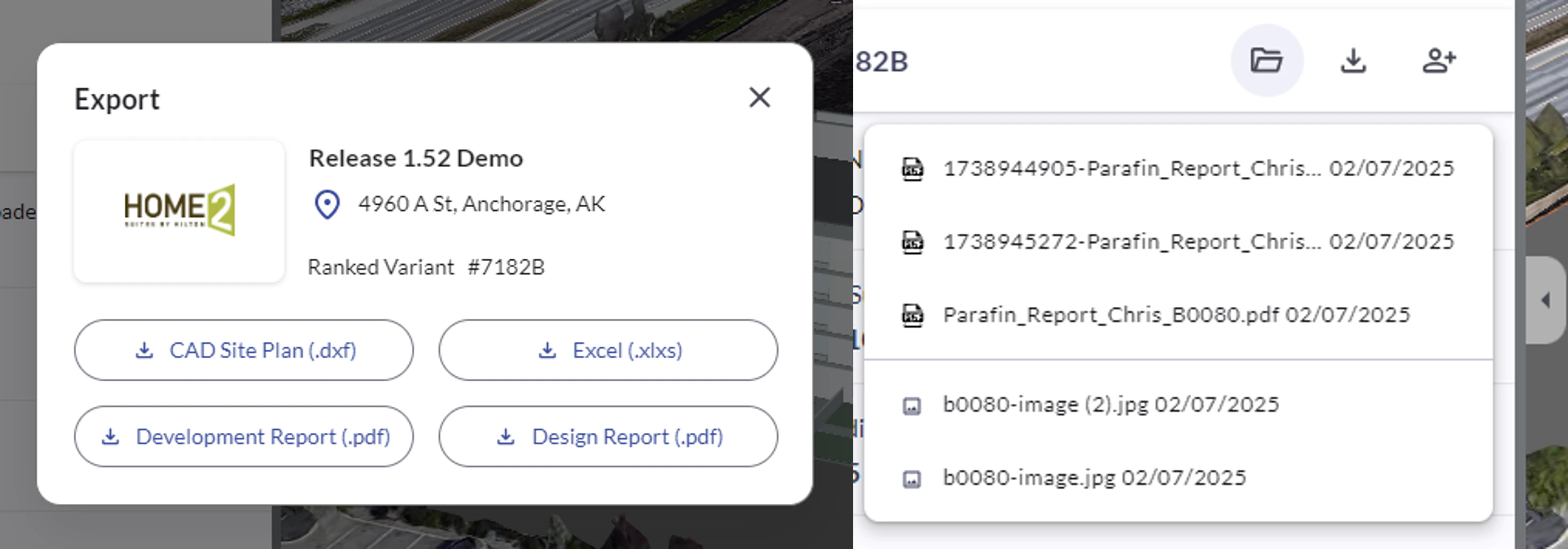
<Frame caption="Export dialog with four export options">
  <img src="https://mintcdn.com/parafin-16645fe6/02WIAw4W18BDb3PZ/images/releases/1.52/exports_dialog.png?fit=max&auto=format&n=02WIAw4W18BDb3PZ&q=85&s=bb7083d9c6516d3ead63f36f19720e3c" alt="Dedicated export window opened from the Variants download button" width="2942" height="1031" data-path="images/releases/1.52/exports_dialog.png" />
</Frame>