> ## Documentation Index
> Fetch the complete documentation index at: https://help.parafin.ai/llms.txt
> Use this file to discover all available pages before exploring further.
# Site Plan Viewer
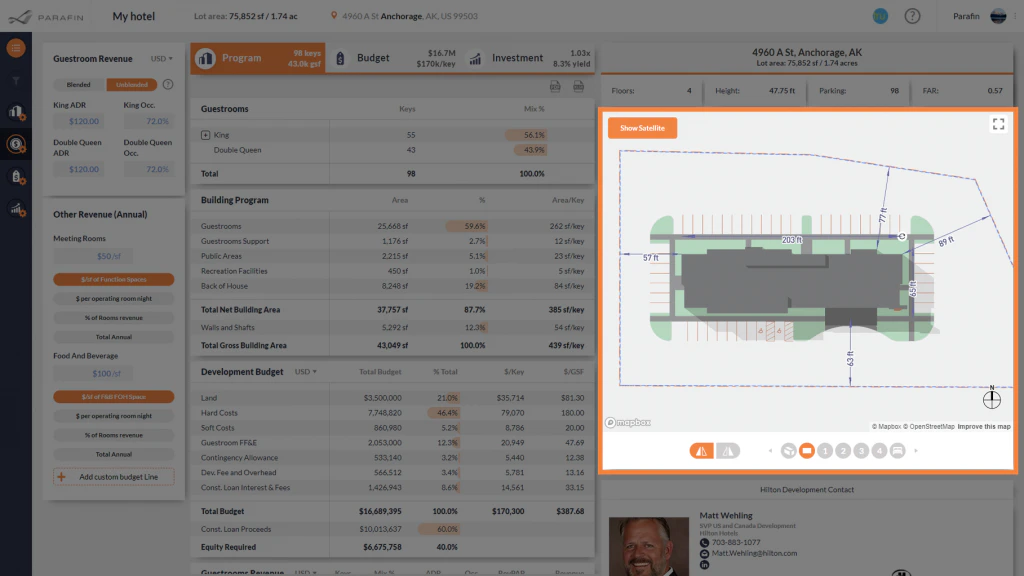
> Top-down view of the selected building with live dimensioning, the viewer toolbar, and map navigation controls.
The Site Plan Viewer shows the selected design from above. Dimensions update live as you rotate or move the building — check setbacks and site geometry without leaving the view.
 ## Viewer toolbar and controls
The same toolbar (top-left) and navigation controls (bottom-right) that live on the [3D Building Viewer](/working-with-projects/3d-viewer) are available here — undo/redo, mirror building, edit boundaries and setbacks, snapshot, Street View / 3D Satellite toggle, re-center, north arrow, and zoom.
## Viewer toolbar and controls
The same toolbar (top-left) and navigation controls (bottom-right) that live on the [3D Building Viewer](/working-with-projects/3d-viewer) are available here — undo/redo, mirror building, edit boundaries and setbacks, snapshot, Street View / 3D Satellite toggle, re-center, north arrow, and zoom.